Your Personal page: rhythm, weekly goal and history
On the Personal tab you see how you are training, and you find your saved workouts and programs. It works the same in the app and on the website.
Your rhythm
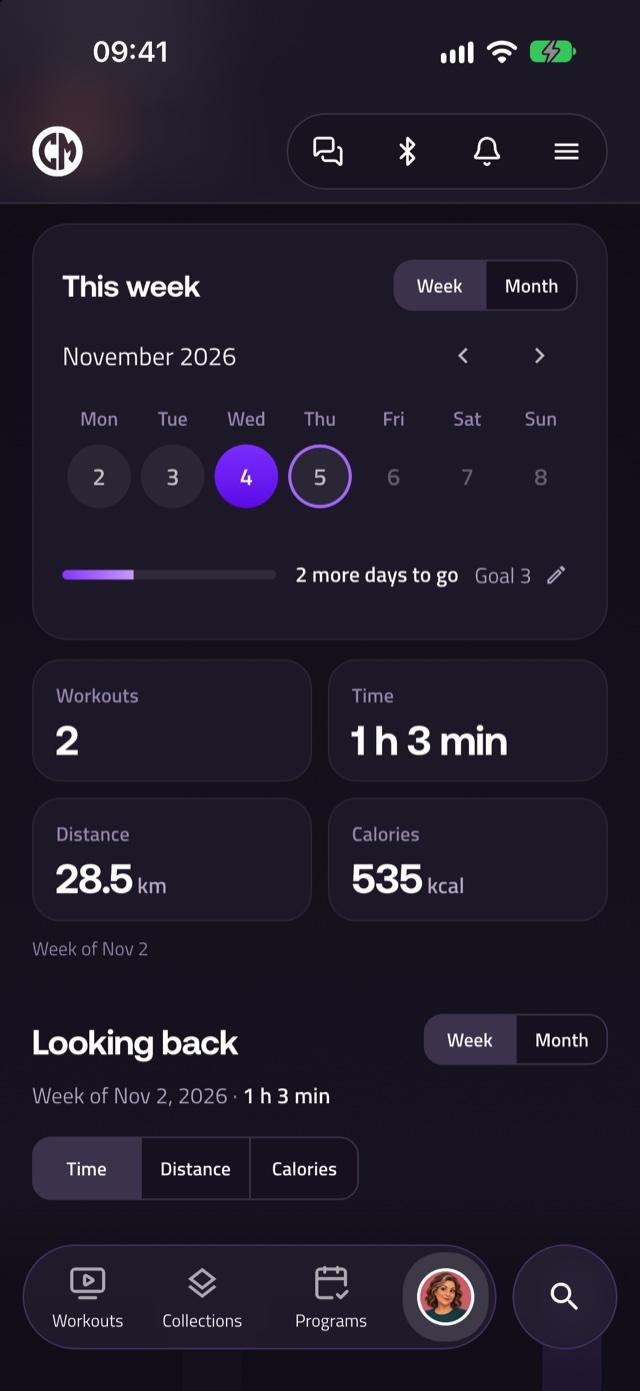
The calendar shows the days on which you completed a workout. Choose Week or Month to change the period. Tap a day to see the workouts you did that day, and tap it again to close them.
Your weekly goal
Tap the Goal button (for example Goal 3) to choose how many days a week you want to train. The page shows how many days you have trained, such as 2 of 3 days, and tells you when you have reached your weekly goal. Your goal is saved on the device where you set it.
Totals and looking back
Below the calendar you see your totals for the week or month: Workouts, Time, Distance and Calories. With Looking back you compare weeks or months. Tap a period to see its calendar and totals.
Your latest workouts and History
Under Your latest workouts you see your three most recent workouts. Tap a workout to open it, or tap the chart icon (View results) to see your results, your rating and your note. Tap History to see all your workouts.
Read more about your workout data after the class and about rating workouts.
For later
Under For later you find Workouts in My list and Programs in My list. Read how to save workouts as a favorite.